
系统安装指南
1. 环境准备
1.1 系统要求
| 软件 | 版本要求 |
|---|---|
| PHP | >= 8.2 |
| Redis | 7.0.0+ |
| MySQL | 5.6.50+ |
| Nginx | 1.16.0+ |
| Composer | 2.0+ |
1.2 扩展要求
- curl
- json
- pdo_mysql
- redis
- mbstring
- openssl
- swoole (可选,用于WebSocket)
2. 安装步骤
2.1 方法一:Git 克隆
# 克隆代码
git clone https://gitee.com/wayfirer/ddicms.git

# 进入项目目录
cd ddicms

# 安装依赖
php composer.phar install
2.2 方法二:Composer 创建
# 直接创建项目(包含依赖安装)
composer create-project ddicloud/ddicms
注意:方法二的优点是安装快捷,缺点是后续 Git 更新不方便。
2.3 运行安装向导
- 将域名解析到项目的
frontend目录 - 在浏览器中访问:
http://你的域名/install/index.php - 按照安装向导的提示完成配置
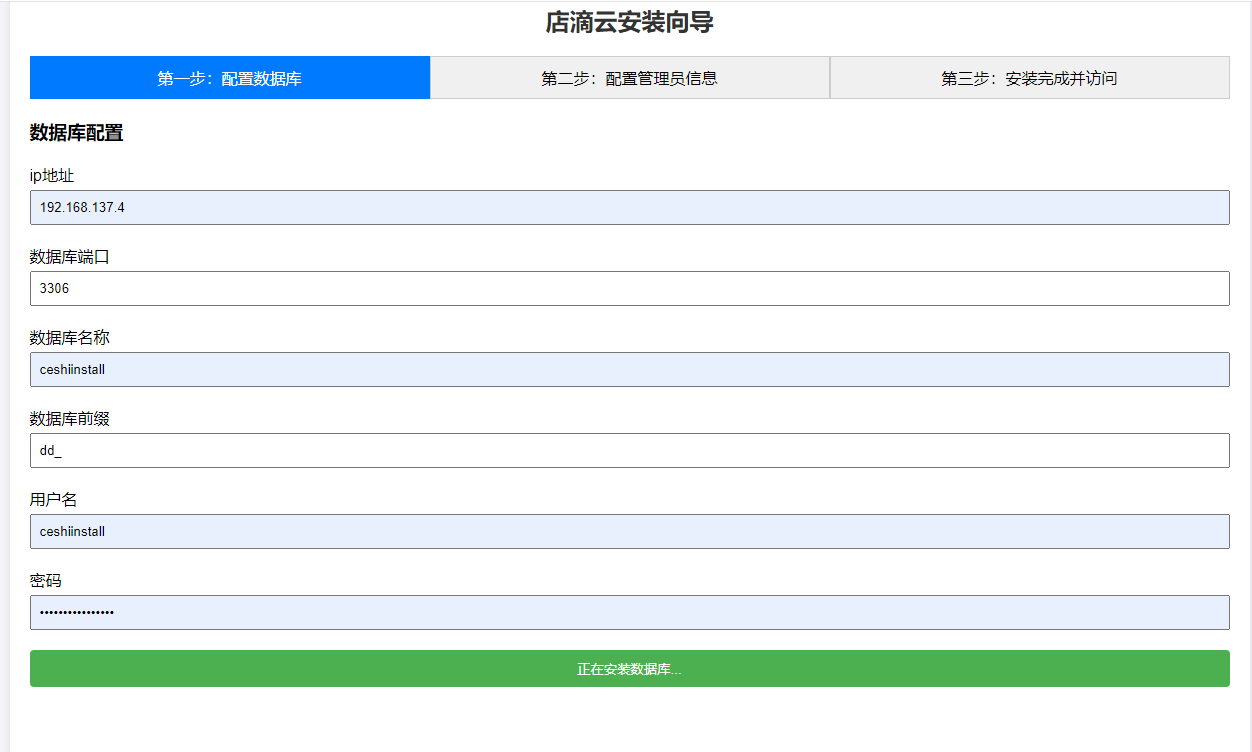
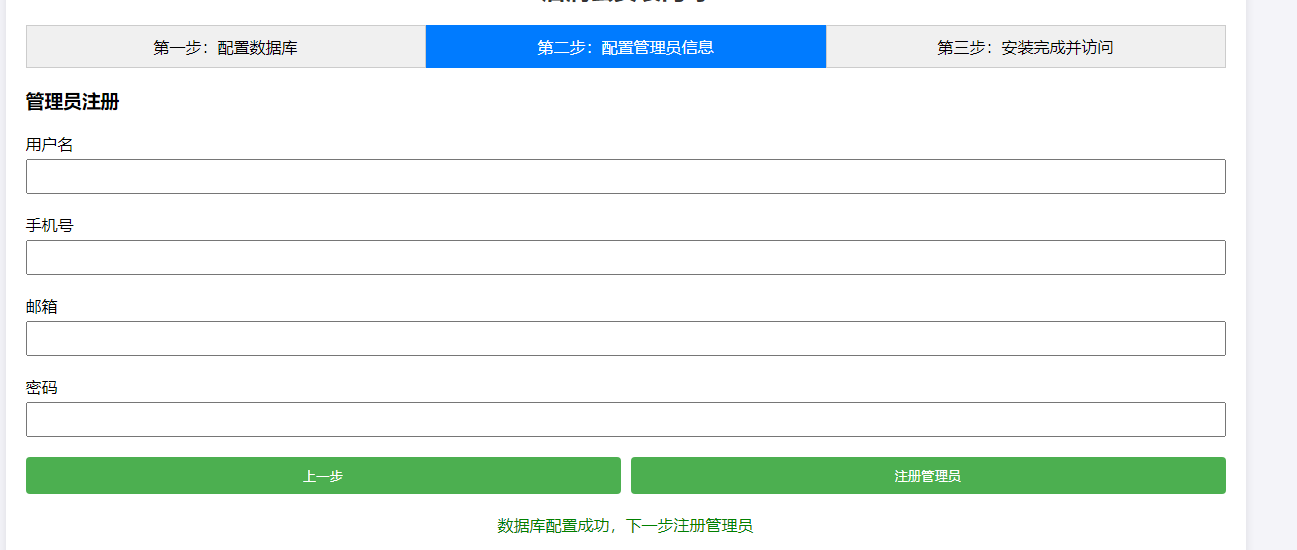
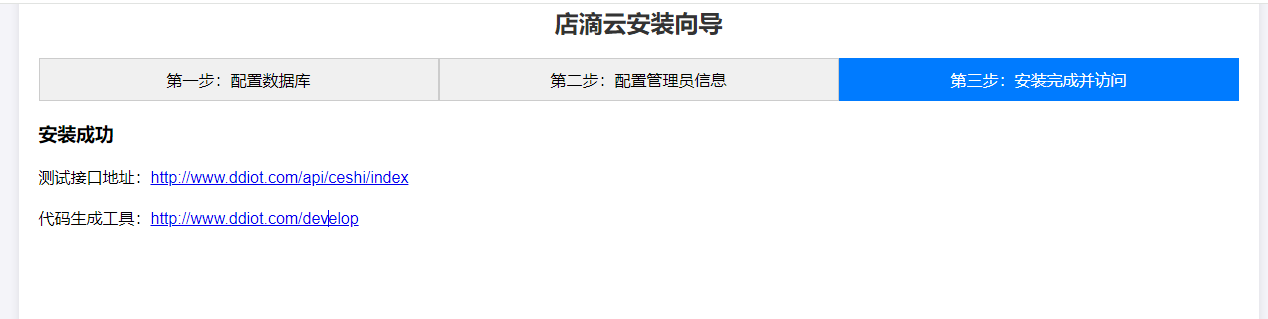
3. Nginx 配置
3.1 基本配置
server {
     listen        80;
     server_name  www.ai.com;
     root   "ddicms/frontend";
     add_header Access-Control-Allow-Origin *;
     add_header Access-Control-Allow-Headers X-Requested-With,Authorization,Content-Type,access-token,bloc-id,store-id;
     add_header Access-Control-Allow-Methods GET,POST,OPTIONS,PUT,DELETE;

     location / {
         index index.php index.html error/index.html;
         error_page 400 /error/400.html;
         error_page 403 /error/403.html;
         error_page 404 /error/404.html;
         error_page 500 /error/500.html;
         error_page 501 /error/501.html;
         error_page 502 /error/502.html;
         error_page 503 /error/503.html;
         error_page 504 /error/504.html;
         error_page 505 /error/505.html;
         error_page 506 /error/506.html;
         error_page 507 /error/507.html;
         error_page 509 /error/509.html;
         error_page 510 /error/510.html;
         include D:/www/firetech/frontend/web/nginx.htaccess;
         autoindex  off;
     }

     location ~ \.php(.*)$ {
         fastcgi_pass   127.0.0.1:9001;
         fastcgi_index  index.php;
         fastcgi_split_path_info  ^((?U).+\.php)(/?.+)$;
         fastcgi_param  SCRIPT_FILENAME  $document_root$fastcgi_script_name;
         fastcgi_param  PATH_INFO  $fastcgi_path_info;
         fastcgi_param  PATH_TRANSLATED  $document_root$fastcgi_path_info;
         include        fastcgi_params;
     }

     # 后端管理
     location /backend {
         index index.html;
         if (!-e $request_filename) {
             rewrite ^/backend/(.*)$ /backend.html last;
         }
     }

     # 商城前端
     location /shop {
         index index.html;
         if (!-e $request_filename) {
             rewrite ^/shop/(.*)$ /shop.html last;
         }
     }

     # API 接口
     location /api {
         index index.php index.html;
         if (!-e $request_filename) {
             rewrite ^/api/(.*)$ /api/index.php last;
         }
     }

     # 后台管理 API
     location /admin {
         index index.php index.html;
         if (!-e $request_filename) {
             rewrite ^/admin/(.*)$ /admin/index.php last;
         }
     }

     # 开发者工具
     location /develop {
         index index.php index.html;
         if (!-e $request_filename) {
             rewrite ^/develop/(.*)$ /develop/index.php last;
         }
     }

     # Gzip 配置
     gzip on;
     gzip_comp_level 5;
     gzip_min_length 256;
     gzip_proxied any;
     gzip_vary on;
}
3.2 常见问题
- 跨域问题:配置文件中已添加跨域头
- PHP 内存不足:在
php.ini中修改memory_limit = 512M - SSL 证书:如需 HTTPS,添加 SSL 配置
- 目录权限:确保
runtime和web/uploads目录可写
4. 后续配置
4.1 环境变量配置
复制 .env.example 文件为 .env,并根据实际情况修改配置:
# 数据库配置
DB_HOST=localhost
DB_PORT=3306
DB_NAME=ddicms
DB_USER=root
DB_PASSWORD=123456

# Redis 配置
REDIS_HOST=localhost
REDIS_PORT=6379
REDIS_PASSWORD=

# 应用配置
APP_DEBUG=false
APP_KEY=your_app_key
4.2 缓存配置
# 清除缓存
yii cache/flush-all

# 重建索引
yii migrate/up
5. 系统升级
5.1 Git 更新
# 拉取最新代码
git pull

# 更新依赖
php composer.phar update

# 运行迁移
yii migrate/up

# 清除缓存
yii cache/flush-all
5.2 手动升级
- 下载最新版本的代码包
- 替换核心文件(保留
config和runtime目录) - 运行迁移和清除缓存
6. 特别鸣谢
感谢以下开源项目的支持(排名不分先后):
- Yii:http://www.yiiframework.com
- EasyWechat:https://www.easywechat.com
- Vue:https://vuejs.org/
- vue-ele-form:https://github.com/dream2023/vue-ele-form
- Element UI:https://element.eleme.cn/
- Swoole:https://www.swoole.com/
7. 技术支持
- 官方文档:https://docs.ddicms.com
- 技术论坛:https://forum.ddicms.com
- GitHub:https://github.com/ddicloud/ddicms
- Gitee:https://gitee.com/wayfirer/ddicms